Check your resume for ATS scan fix in minutes

The fastest way to check your resume for ATS compatibility is to run an ATS scanner right now. Upload your PDF, DOCX, or TXT file (or paste your resume text directly), add the target job description, and you’ll get a score, parsing warnings, missing keywords, and specific fixes within seconds. If you’d rather not upload anything yet, the 5-minute manual checklist below works as a solid fallback.
Two quick choices:
- Run an ATS scanner (recommended): Upload or paste your resume, add the job description for tailored keyword matching, and review your score and category breakdown.
- Use the manual checklist: Flatten your formatting, convert to plain text, verify section headers, match the job title, and confirm your top six keywords appear in context.
What a scan delivers immediately:
- An overall ATS score (typically 0–100)
- Parsing and formatting warnings (columns, images, unusual fonts)
- Missing or underrepresented keywords from the job description
- Section-by-section suggestions you can act on today
Pro Tip: Paste the target job description into the scanner, not just your resume. Generic scans measure formatting only. A job-description scan shifts the scoring to keyword relevance, which is where most rejections actually happen.
Table of Contents
- What does an ATS actually do to your resume?
- What do ATS resume checkers actually test for?
- How does ATS scoring work, and what do the numbers mean?
- How to run an ATS scan right now
- Common ATS-blocking issues and how to fix them
- Which file types and export settings reliably pass ATS?
- What are the real limits of ATS checkers?
- How Kutresume approaches ATS optimization
- Key Takeaways
- When should you trust a scanner and when should you do it manually?
- Kutresume makes ATS checks and tailoring repeatable
What does an ATS actually do to your resume?
Applicant tracking systems perform two tasks that determine whether your resume reaches a recruiter. First, they parse your document: the system reads the raw file and extracts fields like your name, contact info, job titles, employers, dates, and education into a structured database record. Second, they rank candidates by matching those extracted fields against the keywords and phrases in the job posting.
Parsing failures are almost always caused by visual formatting. Multi-column layouts, text boxes, embedded images, and headers placed in unusual positions confuse the parser. The system may extract your contact info as part of your job title, or skip your most recent role entirely. Keyword mismatches are a separate problem: even a well-parsed resume can rank low if it uses synonyms the job posting doesn’t, omits the exact job title, or buries technical skills where the ATS weights them less.
According to a survey cited by Novorésumé, 82.3% of recruiters use an ATS to screen candidates. That means that the majority of applications are filtered before a human ever reads them. A clean single-column structure plus job-targeted keywords is the minimum required to pass those filters.
What do ATS resume checkers actually test for?
Top scanners run 60 or more distinct checks across formatting, parsing, and keyword relevance. Here’s what they’re evaluating:
Parsing and structure checks:
- Section headers are present and use standard labels (Contact, Summary, Experience, Education, Skills)
- Chronological structure is consistent and dates follow a readable format
- No columns, tables, or text boxes that break parser extraction
- Contact information appears as plain text, not inside a header graphic
File and technical checks:
- File type is PDF, DOCX, or TXT (not an image-based PDF)
- Fonts are embedded or standard system fonts (Calibri, Arial, Times New Roman)
- No hidden text, unusual Unicode characters, or pictogram bullets
- Text is selectable and extractable from the exported file
Keyword and relevance checks:
- Job title in your headline matches (or closely mirrors) the target role
- Skill and technology keywords appear in both the Skills section and Experience bullets
- Keywords are placed near the top of the document, not buried in the last role
- Soft-skill phrasing aligns with the job posting’s language
Content-quality checks:
- Bullets open with strong action verbs (managed, built, reduced, led)
- Results are quantified where possible (reduced costs by 18%, grew pipeline to $2M)
- No jargon mismatches or outdated job titles that break semantic matching
- Sections aren’t unusually short (a two-line Experience section raises flags)
Scoring and match checks:
- How many target keywords from the job description appear in your resume
- Semantic similarity: phrasing that means the same thing even if the exact word differs
- Section-by-section relevance weighting
Pro Tip: Good scanners test both raw keyword matches and semantic proximity. A resume that says “managed customer relationships” may partially match a posting that says “CRM administration,” but adding “Salesforce CRM” explicitly will score higher if that’s what the job requires and it’s accurate.
How does ATS scoring work, and what do the numbers mean?
Most ATS checkers produce a composite score built from several weighted components: parsing/formatting, keyword match percentage, content quality, and an overall pass score. The exact weighting varies by tool. Scanners assign ranges of scores with suggested fixes based on their own thresholds.
Scanners like NestCV recommend aiming for a strong passing score, with scores well below that signaling critical problems that may filter your resume out before a recruiter sees it.
Scores vary across tools because each scanner weights components differently. One tool may penalize formatting heavily; another prioritizes keyword density. That’s why running the same resume through two different scanners can produce different numbers. The practical takeaway: treat your score as directional, not definitive. Fix the categories flagged as low, re-scan, and watch the trend.
How to run an ATS scan right now
Using an ATS scanner tool
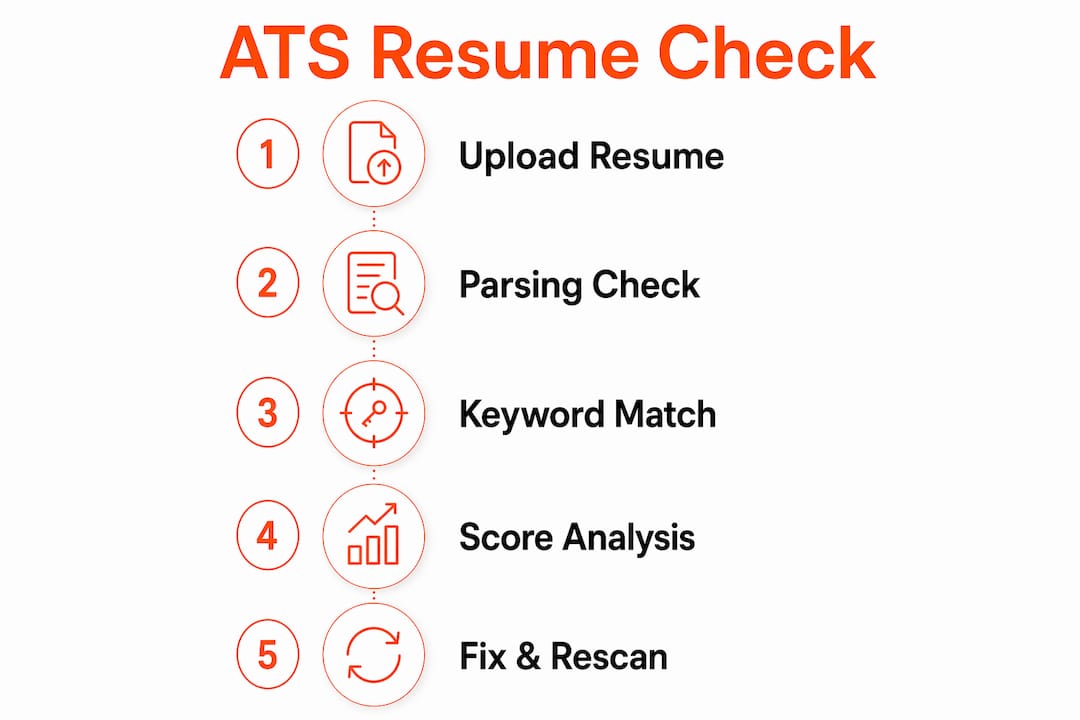
- Open your ATS scanner of choice (Kutresume’s built-in checker, or a standalone tool).
- Upload your resume as a PDF, DOCX, or TXT file, or paste the text directly into the input field.
- Paste the full job description from the posting you’re targeting. This shifts scoring from generic formatting checks to job-specific keyword relevance.
- Review your overall score and the category breakdown (formatting, keywords, content quality).
- Apply the suggested fixes in priority order: parsing blockers first, then keywords, then content quality.
- Re-export your updated resume as an ATS-safe PDF or DOCX and re-scan until your score stabilizes above 80.
Manual 5-step alternative (no upload needed)
- Flatten formatting: Remove all columns, text boxes, and tables. Convert to a single-column layout.
- Convert to plain text: Paste your resume into Notepad or TextEdit (plain text mode). If it looks garbled, your formatting has parsing problems.
- Verify section headers: Confirm you have Contact, Summary, Experience, Education, and Skills labeled in plain text.
- Match job title and top six keywords: Find the six most repeated skills or requirements in the job posting and confirm each appears at least once in your resume.
- Check date formats: Use a consistent “Month Year” format (e.g., March 2023) directly after each job title or company name.
The re-scan cycle matters. Update your resume, export as ATS-safe PDF or DOCX, then re-scan. One pass rarely catches everything. Most job seekers need two or three iterations to push a score from the 60s into the 80s.
Pro Tip: Save a separate “ATS-only” version of your resume as a plain DOCX. Keep your visually designed version for emailing directly to contacts or attaching to LinkedIn messages. Applying from the ATS-only version means you’re never scrambling to strip formatting at the last minute.
Common ATS-blocking issues and how to fix them
Most score drops trace back to a short list of recurring problems. Here’s what to look for and exactly how to fix each one.

Columns and tables
Parsers read documents left to right, top to bottom. A two-column layout causes the parser to mix content from both columns into a single jumbled stream. Convert everything to a single column. For your contact block, replace a side-by-side layout with stacked lines:
Before: [Name] [Phone | Email | LinkedIn] (two columns)
After:
Jane Smith
jane@email.com | 555-123-4567
linkedin.com/in/janesmith
Images and icons
Skill-bar graphics, headshot photos, and icon bullets are invisible to parsers. Remove them entirely. Replace a LinkedIn icon with the plain text: LinkedIn: linkedin.com/in/yourname. Move portfolio links to a plain-text line in your contact block.
Fonts and special characters
Decorative fonts and pictogram bullets (arrows, stars, custom shapes) often export as unreadable characters. Switch to Calibri, Arial, or Georgia. Replace pictogram bullets with a plain hyphen or standard bullet point (•).
Missing or incorrect section headers
If your Experience section is labeled “Where I’ve Worked” or your Skills section is called “My Toolkit,” the parser may not recognize them. Use standard labels: Contact, Summary, Experience, Education, Skills. Plain text, no styling required.
Keyword placement problems
Keywords buried in your third or fourth role carry less weight than those near the top. Add a Skills section directly below your Summary. If the job posting says “project management” and your resume says “led cross-functional initiatives,” add the exact phrase. Only do this if it’s accurate.
Example: Turn “Managed team projects” into “Project management: led 4 cross-functional teams across a $1.2M product launch.”
Date and chronology issues
Inconsistent date formats (mixing “2022–present” with “Jan 2021 to Dec 2021”) confuse parsers. Pick one format and apply it everywhere. Place dates immediately after the job title or company name on the same line.
Pro Tip: Add a one-line job-title headline directly under your name that matches the target role exactly. If the posting says “Senior Data Analyst,” your headline should say “Senior Data Analyst.” This single change often produces the largest single-keyword score jump.
Which file types and export settings reliably pass ATS?
The format you export matters as much as the content. Here’s what works and what to avoid.
Formats that parse reliably:
- DOCX exported from Microsoft Word or Google Docs (most universally compatible)
- Simple PDF exported from Word or Google Docs using “Save as PDF” (not printed to PDF via a driver)
- Plain TXT for a quick local check of what a parser actually extracts
Formats to avoid:
- Image-based PDFs (scanned documents or PDFs saved from design tools like Canva or Adobe InDesign)
- Resume templates with multi-column layouts, text boxes, background images, or positioned graphics
- PDFs created by printing to a PDF driver, which sometimes flattens text into an image layer
Export checklist:
- Use standard system fonts (Calibri, Arial, Times New Roman) or embed fonts before exporting
- Open the exported PDF and try to click and drag to select text. If you can’t highlight the text, the ATS can’t read it either
- Paste the PDF’s text into a plain text editor and review it for garbled output before uploading
- Choose templates labeled “ATS-friendly” or use a plain reverse-chronological layout. The ATS-friendly resume template from Kutresume is built specifically to pass modern parsers
Pro Tip: The text-selection test is the fastest local check you have. Open your exported PDF, press Ctrl+A (or Cmd+A on Mac), and try to copy the text. If it copies cleanly into a text editor, your PDF is parser-ready. If it copies as gibberish or nothing at all, re-export from Word or Google Docs.

What are the real limits of ATS checkers?
No scanner can perfectly simulate every ATS. Enterprise platforms like Workday, Taleo, Greenhouse, and iCIMS each use different parsing engines and keyword-weighting models. A score of 85 on one checker doesn’t guarantee your resume passes every system. Treat scanner results as a strong directional signal, not a guarantee.
Key limitations to keep in mind:
- Parser variance: The same resume may score differently across tools because each tool models a different ATS vendor’s behavior.
- False positives: Some scanners suggest adding many keywords aggressively. Prioritize truthful, relevant matches. Keyword stuffing is detectable by recruiters and some newer ATS platforms.
- Semantic gaps: Scanners vary in how well they handle semantic matching. A tool that only checks exact keywords will penalize you for using “Python scripting” when the posting says “Python development,” even though they mean the same thing.
Privacy: what to check before uploading
Some scanners run entirely in your browser, meaning your resume data never leaves your device. Others upload your file to a server for processing. Before uploading, read the tool’s privacy statement. Look for whether the tool stores your data, shares it with third parties, or uses it to train models.
If you’re concerned about sharing personal data, the safest local check is to copy your exported PDF into a plain text file yourself. That tells you exactly what a parser would extract without sending anything anywhere.
Cost signals
Most tools offer a free scan for basic formatting and keyword checks. Tailored reports, iterative re-scanning, and full resume rewrites typically sit behind a paid tier. Free scans are useful for a quick pass; paid tailoring is worth it when you’re applying to multiple roles with different requirements.
Pro Tip: Before uploading to any new tool, paste your resume into a plain text editor first. That’s your baseline. Compare what the tool reports against what you can see in plain text. If the tool flags a section you know is clean, the issue is likely the tool’s parser model, not your resume.
How Kutresume approaches ATS optimization
Kutresume’s method goes beyond a single score. The platform runs a side-by-side analysis of your uploaded resume and the target job description, surfacing exact keyword matches, title alignment, structural issues, and prioritized edits in a single view.
The Kutresume process:
- Upload your existing resume (PDF or DOCX) and paste or link the job description
- The system identifies keyword gaps, title mismatches, and parsing risks simultaneously
- You receive a prioritized edit list: parsing blockers first, then keyword additions, then content quality improvements
- Apply edits directly in the platform or export the tailored resume as an ATS-safe PDF or DOCX
- Version history lets you maintain separate tailored resumes for different roles without overwriting your base file
Kutresume optimizes for both parsability (structure and formatting) and semantic relevance (keywords and phrasing), which is the combination that moves the needle on interview callbacks. The step-by-step ATS optimization checklist on the Kutresume blog documents the exact editing order that produces the fastest score improvements: remove parsing blockers first, correct headers and dates, insert the exact job title in your headline, add top 6–8 keywords in Skills and Experience bullets, then re-export and re-scan.
The platform also generates matching cover letters in ATS-safe formats, so your application is consistent from resume to cover letter. Kutresume never fabricates experience: every keyword and phrase it suggests is drawn from your actual uploaded content matched against the job description.
Key Takeaways
Checking your resume for ATS compatibility requires fixing parsing blockers first, then adding exact job-title and keyword matches, and re-scanning until your score reaches 80 or above.
| Point | Details |
|---|---|
| Run a job-description scan | Paste the target job description into the scanner to get keyword-specific results, not just a generic formatting score. |
| Fix parsing blockers first | Remove columns, images, and text boxes before addressing keywords — structural errors cause the largest score drops. |
| Target a score of 80+ | Scanners like NestCV flag below 70 as critical; aim for 80 or above, with 90+ considered excellent. |
| Verify your PDF before uploading | Select and copy text from your exported PDF — if it doesn’t copy cleanly, the ATS can’t read it either. |
| Use Kutresume for multi-role tailoring | Kutresume’s side-by-side analysis and version history make it practical to maintain separate ATS-optimized resumes for different roles. |
When should you trust a scanner and when should you do it manually?
Free ATS scanners are genuinely useful for two things: a quick initial check and keyword discovery when you’re tailoring a new application. Run one before you apply to any role where you’re not already a strong match on paper. The score tells you where to spend your editing time.
Manual edits make more sense than you might expect for job seekers applying to a cluster of similar roles. If you’re targeting five variations of “Product Manager” at mid-size tech companies, a single well-optimized ATS baseline resume with minor keyword swaps per role is often faster than running a full paid tailoring cycle for each application. Build that baseline once, verify it scores above 80, and adjust the top six keywords per role.
Where paid tailoring earns its cost is at the edges: when your scores stubbornly stay below target despite manual fixes, when you’re pivoting to a new industry where your existing language doesn’t map cleanly to the new role’s vocabulary, or when you’re applying to many different role types simultaneously. In those cases, the time cost of manual iteration outweighs the subscription cost quickly.
The other thing free scanners can’t do is rewrite your content to reflect a new role’s framing while staying honest about your experience. That’s the gap Kutresume fills. A scanner tells you what’s missing; Kutresume helps you add it accurately.
Kutresume makes ATS checks and tailoring repeatable
Most job seekers check their resume for ATS once, make a few edits, and move on. The problem is that each new job description requires a different keyword profile. What scores 85 for a “Data Analyst” role may score 62 for a “Business Intelligence Analyst” posting, even when the underlying skills are identical.
Kutresume solves the repetition problem. Upload your base resume once, paste a job description, and the platform produces a tailored, ATS-optimized resume with a prioritized fix list, keyword match report, and a matching cover letter. Export as PDF or DOCX, both in ATS-safe formats. Version history keeps every tailored resume organized so you’re not rebuilding from scratch each time.
The subscription model (monthly or lifetime options) is built for job seekers applying to multiple roles. One tailored resume per application is the standard; Kutresume makes that practical at volume. Find plan details and start your first tailored resume at kutresume.com.
Pro Tip: Use Kutresume to build two files: an ATS-only DOCX for online applications and a visually designed PDF for direct outreach and interviews. Keep both current and you’ll never need to strip formatting under deadline pressure.
Stop rewriting. Start tailoring.
KUT does everything in this article automatically, in about 30 seconds per job.
Tailor my CV →